


Mình nhờ AI viết một đoạn code nhỏ để theo dõi chuyển đổi từ google ads : gọi điện, bấm zalo, gửi form ( fluent form). Đoạn code này còn theo dõi được từ khóa kích hoạt quảng cáo và quan trọng nhất là IP truy cập quảng cáo của bạn, giúp bạn dễ dàng chặn các IP nghi vấn truy cập nhiều
Website được mình bàn giao từ 05/2026 sẽ có sẵn chức năng này, mọi người không cần cài thêm, kéo xuống dưới để xem cách sử dụng thôi nhe
Cách Cài Theo Dõi Chuyển Đổi Và IP Đáng Ngờ Từ Google Ads Trực Tiếp Trên Website
Đầu tiên, các bạn kiểm tra xem website đã có sẵn plugin Code Spippets chưa, nếu chưa thì các bạn cài đặt plugin Code Snippets lên website.
- Cách kiểm tra, vào quảng trị website nhìn góc trái, bên dưới phần Cài Đặt vài hảng có menu Code Snippets nghĩa là website đã có plugin này, kéo tới hết menu luôn mà không có chữ Code Snippets nghĩa là chưa cài
- Nếu chưa cài, các bạn vào phần “Plugin” >> cài mới >> tìm “code spippets” >> bấm cài đặt >> đợi >> bấm kích hoạt
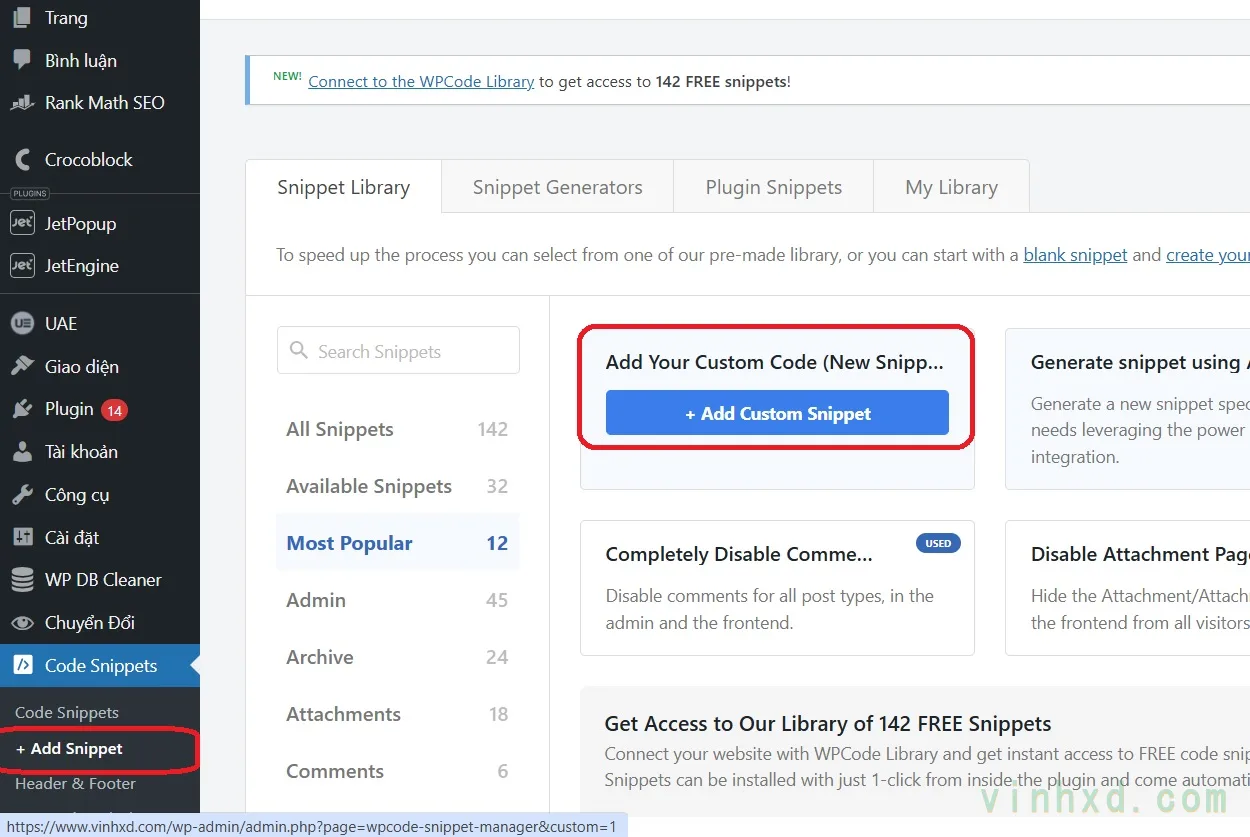
Sau khi có Code Spippets trên máy, các bạn vào Code Spippets >> Add Snippet >> Chọn ô đầu tiên
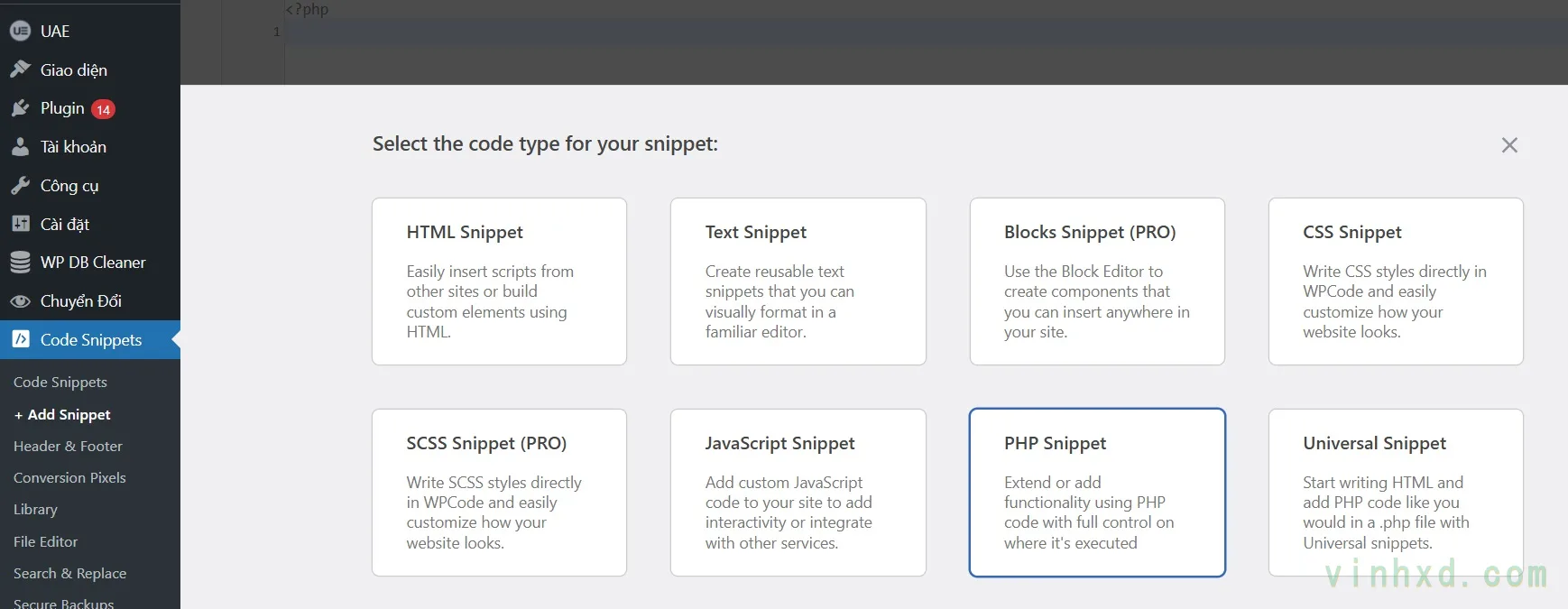
Tiếp theo bạn chọn PHP Snippets, đặt tên Snippets là “Theo Dõi Chuyển Đổi”, góc trái chọn “Active” luôn, sau đó dán code dưới dây vào rồi lưu
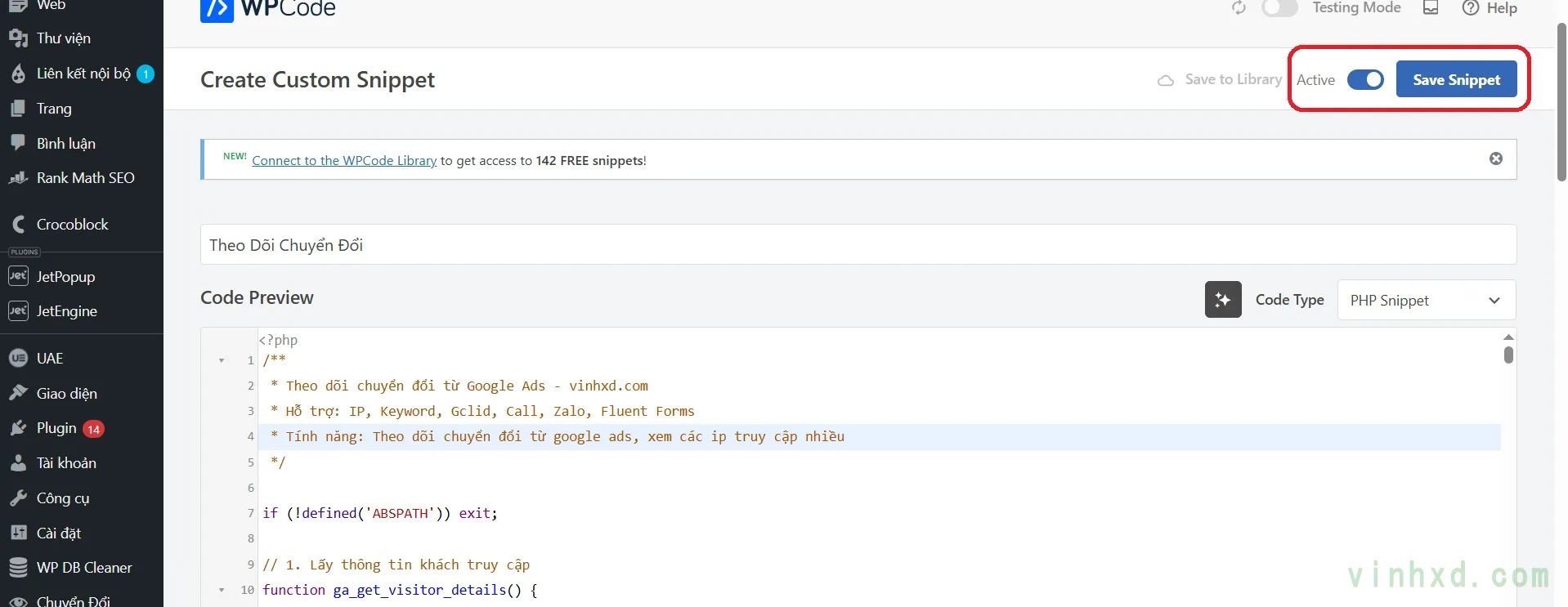
Chú ý: nếu có sẵn chức năng theo dõi chuyển đổi rồi mà chèn code này vào thêm thì sẽ lỗi web, mọi người để ý menu bên trái, nếu có menu “Chuyển Đổi” rồi thì không chèn thêm code này vào nhé, có rồi thì nhớ kéo xuống dưới để biết cách sử dụng chức năng này nhé
/**
 * Theo dõi chuyển đổi từ Google Ads - vinhxd.com
 * Hỗ trợ: IP, Keyword, Gclid, Call, Zalo, Fluent Forms
 * Tính năng: Cảnh báo IP truy cập nhiều từ Ads (Cam/Đỏ)
 */

if (!defined('ABSPATH')) exit;

// 1. Lấy thông tin khách truy cập
function ga_get_visitor_details() {
    $ip = !empty($_SERVER['HTTP_CF_CONNECTING_IP']) ? $_SERVER['HTTP_CF_CONNECTING_IP'] : (!empty($_SERVER['HTTP_X_FORWARDED_FOR']) ? explode(',', $_SERVER['HTTP_X_FORWARDED_FOR'])[0] : $_SERVER['REMOTE_ADDR']);
    $ua = strtolower($_SERVER['HTTP_USER_AGENT']);
    $device = (strpos($ua, 'mobile') !== false || strpos($ua, 'android') !== false) ? 'Mobile' : ( (strpos($ua, 'ipad') !== false || strpos($ua, 'tablet') !== false) ? 'Tablet' : 'Desktop' );

    $kw = !empty($_GET['keyword']) ? sanitize_text_field(urldecode($_GET['keyword'])) : (isset($_COOKIE['ga_keyword']) ? $_COOKIE['ga_keyword'] : '(không có)');
    $gclid = !empty($_GET['gclid']) ? sanitize_text_field($_GET['gclid']) : (isset($_COOKIE['ga_gclid']) ? $_COOKIE['ga_gclid'] : '');

    return [
        'ip' => trim($ip),
        'device' => $device,
        'keyword' => $kw,
        'source' => (!empty($gclid) || ($kw !== '(không có)' && isset($_GET['gclid']))) ? 'Google Ads' : 'Tự nhiên/Khác'
    ];
}

// 2. Ghi Log vào CSV
function ga_write_smart_log($type = 'visit') {
    $info = ga_get_visitor_details();
    $file = trailingslashit(wp_upload_dir()['basedir']) . 'ip-logs/visitors.csv';

    if (!file_exists(dirname($file))) {
        wp_mkdir_p(dirname($file));
        file_put_contents(dirname($file).'/.htaccess', "Deny from all");
    }

    if (!file_exists($file)) {
        file_put_contents($file, "datetime,ip,action,keyword,device,source,count,referrer\n");
    }

    $rows = file($file);
    $updated = false;
    $now = current_time('mysql');

    $action_labels = [
        'call'      => 'Call Click',
        'zalo'      => 'Zalo Click',
        'form_lead' => 'Gửi Form',
        'visit'     => 'Visit'
    ];
    $action_label = isset($action_labels[$type]) ? $action_labels[$type] : 'Visit';

    for ($i = count($rows) - 1; $i >= 1; $i--) {
        $data = str_getcsv($rows[$i]);
        // Nếu cùng IP, cùng hành động và trong vòng 3 phút thì gộp log
        if (isset($data[1]) && $data[1] === $info['ip'] && $data[2] === $action_label && (strtotime($now) - strtotime($data[0]) < 180)) {
            $data[6] = (int)$data[6] + 1;
            $rows[$i] = '"' . implode('","', $data) . '"' . PHP_EOL;
            $updated = true;
            break;
        }
    }

    if (!$updated) {
        $rows[] = sprintf('"%s","%s","%s","%s","%s","%s","%d","%s"' . PHP_EOL,
            $now, $info['ip'], $action_label, $info['keyword'], $info['device'], $info['source'], 1,
            isset($_SERVER['HTTP_REFERER']) ? esc_url_raw($_SERVER['HTTP_REFERER']) : 'Direct'
        );
    }

    file_put_contents($file, implode('', $rows), LOCK_EX);
}

// 3. Xử lý Cookies & Visit Ban đầu
add_action('init', function() {
    if (is_admin() || (defined('DOING_AJAX') && DOING_AJAX)) return;
    if (!empty($_GET['keyword'])) setcookie('ga_keyword', sanitize_text_field($_GET['keyword']), time() + 86400, '/');
    if (!empty($_GET['gclid'])) setcookie('ga_gclid', sanitize_text_field($_GET['gclid']), time() + 86400, '/');

    $lock = 'ga_v_'.md5(ga_get_visitor_details()['ip']);
    if (!get_transient($lock)) {
        set_transient($lock, 1, 180);
        ga_write_smart_log('visit');
    }
});

// 4. Theo dõi Fluent Forms
add_action('fluentform/submission_inserted', function ($submission, $formData, $form) {
    ga_write_smart_log('form_lead');
}, 10, 3);

// 5. AJAX & Tracking Script
add_action('wp_ajax_log_contact_click', 'ga_handle_ajax_log');
add_action('wp_ajax_nopriv_log_contact_click', 'ga_handle_ajax_log');
function ga_handle_ajax_log() {
    if (isset($_POST['type']) && in_array($_POST['type'], ['call', 'zalo'])) {
        ga_write_smart_log($_POST['type']);
    }
    wp_send_json_success();
}

add_action('wp_footer', function() { ?>
    <script>
    document.addEventListener('click', function(e) {
        var a = e.target.closest('a'); if (!a) return;
        var href = a.getAttribute('href') || '', type = href.startsWith('tel:') ? 'call' : (href.includes('zalo.me/') ? 'zalo' : '');
        if (type) {
            var fd = new FormData(); fd.append('action', 'log_contact_click'); fd.append('type', type);
            fetch('<?php echo admin_url('admin-ajax.php'); ?>', { method: 'POST', body: fd });
        }
    }, true);
    </script>
<?php });

// 6. Giao diện Admin Reports
add_action('admin_menu', function(){
    add_menu_page('Chuyển Đổi', 'Chuyển Đổi', 'manage_options', 'ads-logs', 'ga_render_logs', 'dashicons-visibility', 80);
});

function ga_render_logs() {
    $file = trailingslashit(wp_upload_dir()['basedir']) . 'ip-logs/visitors.csv';
    $filter = isset($_GET['log_filter']) ? $_GET['log_filter'] : 'all';
    ?>
    <style>
        #ads-logs-wrap { max-width: 1200px; font-family: -apple-system, BlinkMacSystemFont, "Segoe UI", sans-serif; margin-top: 20px; }
        #ads-logs-wrap h1 { color: #0E9577; font-size: 22px; font-weight: 700; margin-bottom: 15px; }

        .ads-notice { background: #f0fdf9; border-left: 4px solid #0E9577; padding: 12px 16px; border-radius: 4px; margin-bottom: 20px; font-size: 13.5px; }
        .ads-notice a { color: #0E9577; font-weight: 600; text-decoration: none; }

        .ads-toolbar { display: flex; align-items: center; justify-content: space-between; background: #fff; border: 1px solid #e5e7eb; border-radius: 8px; padding: 12px 16px; margin-bottom: 16px; }
        .ads-filters { display: flex; gap: 6px; }
        .ads-filters input[type=radio] { display: none; }
        .ads-filters label { padding: 7px 16px; border-radius: 6px; font-size: 13px; font-weight: 500; cursor: pointer; border: 1.5px solid #e5e7eb; color: #555; background: #fafafa; transition: all .15s; }
        .ads-filters input[type=radio]:checked + label { background: #0E9577; border-color: #0E9577; color: #fff; }

        .ads-btn-download { display: inline-flex; align-items: center; gap: 6px; background: #0E9577; color: #fff !important; padding: 7px 16px; border-radius: 6px; font-size: 13px; font-weight: 600; text-decoration: none !important; }

        #ads-logs-wrap table { border-radius: 8px; overflow: hidden; border: 1px solid #e5e7eb; border-collapse: separate; border-spacing: 0; width: 100%; font-size: 13px; background: #fff; }
        #ads-logs-wrap table thead th { background: #0E9577; color: #fff; font-weight: 600; padding: 12px 14px; text-align: left; text-transform: uppercase; font-size: 11px; }
        #ads-logs-wrap table tbody td { padding: 10px 14px; border-bottom: 1px solid #f0f0f0; vertical-align: middle; }

        /* Row Styles */
        .row-ads-warn { background-color: #fff9f0 !important; border-left: 4px solid #f97316 !important; }
        .row-ads-danger { background-color: #fff5f5 !important; border-left: 4px solid #ef4444 !important; }

        /* Badges */
        .badge { display: inline-block; padding: 3px 9px; border-radius: 20px; font-size: 11px; font-weight: 600; }
        .badge-visit { background: #f3f4f6; color: #555; }
        .badge-call { background: #fee2e2; color: #b91c1c; }
        .badge-zalo { background: #dbeafe; color: #1d4ed8; }
        .badge-form { background: #dcfce7; color: #15803d; }

        .count-badge { display: inline-block; margin-left: 5px; padding: 2px 6px; border-radius: 4px; font-size: 10px; font-weight: bold; cursor: help; }
        .count-warn { background: #ffedd5; color: #9a3412; border: 1px solid #fdba74; }
        .count-danger { background: #fee2e2; color: #991b1b; border: 1px solid #fca5a5; }
    </style>

    <div class="wrap" id="ads-logs-wrap">
        <h1>📊 Nhật ký quảng cáo & Chuyển đổi</h1>

        <div class="ads-notice">
            💡 Hệ thống đang tách biệt <strong>Visit từ Google Ads</strong> để cảnh báo IP truy cập nhiều.
            Màu Cam (3-5 lần), Màu Đỏ (>5 lần).
        </div>

        <?php if (!file_exists($file)) { echo '<p>Chưa có dữ liệu.</p></div>'; return; } ?>

        <div class="ads-toolbar">
            <form method="get" style="margin:0;">
                <input type="hidden" name="page" value="ads-logs">
                <div class="ads-filters">
                    <?php
                    $filters = [
                        'all'        => '🗂 Tất cả',
                        'conversion' => '🔥 Chỉ chuyển đổi',
                        'frequent'   => '🚫 IP truy cập nhiều',
                    ];
                    foreach ($filters as $val => $label) {
                        $checked = ($filter === $val) ? 'checked' : '';
                        echo "<input type='radio' name='log_filter' id='f_{$val}' value='{$val}' {$checked} onchange='this.form.submit()'>
                              <label for='f_{$val}'>{$label}</label>";
                    }
                    ?>
                </div>
            </form>
            <a href="<?php echo esc_url(admin_url('admin.php?page=ads-logs&download=1')); ?>" class="ads-btn-download">⬇ Tải file CSV</a>
        </div>

        <?php
        $lines = file($file);
        array_shift($lines);
        $rows = [];
        foreach ($lines as $ln) {
            $c = str_getcsv($ln);
            if (count($c) < 7) continue;
            $rows[] = $c;
        }

        // ĐẾM RIÊNG VISIT TỪ GOOGLE ADS THEO IP
        $ads_visit_count = [];
        foreach ($rows as $c) {
            if ($c[5] === 'Google Ads') {
                $ads_visit_count[$c[1]] = ($ads_visit_count[$c[1]] ?? 0) + (int)($c[6] ?? 1);
            }
        }

        $filtered = [];
        foreach ($rows as $c) {
            $ip = $c[1];
            $count_from_ads = isset($ads_visit_count[$ip]) ? $ads_visit_count[$ip] : 0;

            if ($filter === 'conversion') {
                if (!in_array($c[2], ['Call Click', 'Zalo Click', 'Gửi Form'])) continue;
            } elseif ($filter === 'frequent') {
                if ($count_from_ads <= 3) continue;
            }
            $filtered[] = $c;
        }
        ?>

        <p class="ads-meta">Hiển thị <strong><?php echo count($filtered); ?></strong> bản ghi.</p>

        <table>
            <thead>
                <tr>
                    <th>Thời gian</th>
                    <th>IP</th>
                    <th>Hành động</th>
                    <th style="text-align:center;">Lượt</th>
                    <th>Từ khóa</th>
                    <th>Thiết bị</th>
                    <th>Nguồn</th>
                </tr>
            </thead>
            <tbody>
            <?php foreach (array_reverse($filtered) as $c):
                $ip = $c[1];
                $action = $c[2];
                $source = $c[5];
                $count_from_ads = isset($ads_visit_count[$ip]) ? $ads_visit_count[$ip] : 0;

                $row_style = '';
                $count_badge = '';

                if ($source === 'Google Ads' || $count_from_ads > 0) {
                    if ($count_from_ads > 5) {
                        $row_style = 'class="row-ads-danger"';
                        $count_badge = '<span class="count-badge count-danger" title="Truy cập từ Ads '.$count_from_ads.' lần">🔴 '.$count_from_ads.'x</span>';
                    } elseif ($count_from_ads >= 3) {
                        $row_style = 'class="row-ads-warn"';
                        $count_badge = '<span class="count-badge count-warn" title="Truy cập từ Ads '.$count_from_ads.' lần">🟠 '.$count_from_ads.'x</span>';
                    }
                }

                $badge_class = 'badge-visit';
                if ($action === 'Call Click') $badge_class = 'badge-call';
                if ($action === 'Zalo Click') $badge_class = 'badge-zalo';
                if ($action === 'Gửi Form')  $badge_class = 'badge-form';
            ?>
                <tr <?php echo $row_style; ?>>
                    <td style="color:#777;font-size:11px;"><?php echo esc_html($c[0]); ?></td>
                    <td><strong><?php echo esc_html($ip); ?></strong> <?php echo $count_badge; ?></td>
                    <td><span class="badge <?php echo $badge_class; ?>"><?php echo $action; ?></span></td>
                    <td style="text-align:center;font-weight:700;"><?php echo (int)$c[6]; ?></td>
                    <td><?php echo esc_html($c[3]); ?></td>
                    <td style="color:#888;"><?php echo esc_html($c[4]); ?></td>
                    <td style="font-weight:<?php echo ($source === 'Google Ads' ? '600' : '400'); ?>; color:<?php echo ($source === 'Google Ads' ? '#0E9577' : '#888'); ?>;">
                        <?php echo esc_html($source); ?>
                    </td>
                </tr>
            <?php endforeach; ?>
            </tbody>
        </table>
    </div>
    <?php
}

// 7. Tự động dọn dẹp Log cũ (90 ngày)
if (!wp_next_scheduled('ga_clean_logs')) wp_schedule_event(time(), 'daily', 'ga_clean_logs');
add_action('ga_clean_logs', function() {
    $file = trailingslashit(wp_upload_dir()['basedir']) . 'ip-logs/visitors.csv';
    if (!file_exists($file)) return;
    $lines = file($file);
    $new = [array_shift($lines)];
    foreach ($lines as $l) {
        $c = str_getcsv($l);
        if (isset($c[0]) && strtotime($c[0]) > strtotime('-90 days')) $new[] = $l;
    }
    file_put_contents($file, implode('', $new), LOCK_EX);
});

// 8. Xử lý tải file CSV
add_action('admin_init', function() {
    if (isset($_GET['page']) && $_GET['page'] == 'ads-logs' && isset($_GET['download'])) {
        $file = trailingslashit(wp_upload_dir()['basedir']) . 'ip-logs/visitors.csv';
        if (file_exists($file)) {
            header('Content-Type: text/csv; charset=utf-8');
            header('Content-Disposition: attachment; filename=ads-logs-'.date('Y-m-d').'.csv');
            readfile($file);
            exit;
        }
    }
});
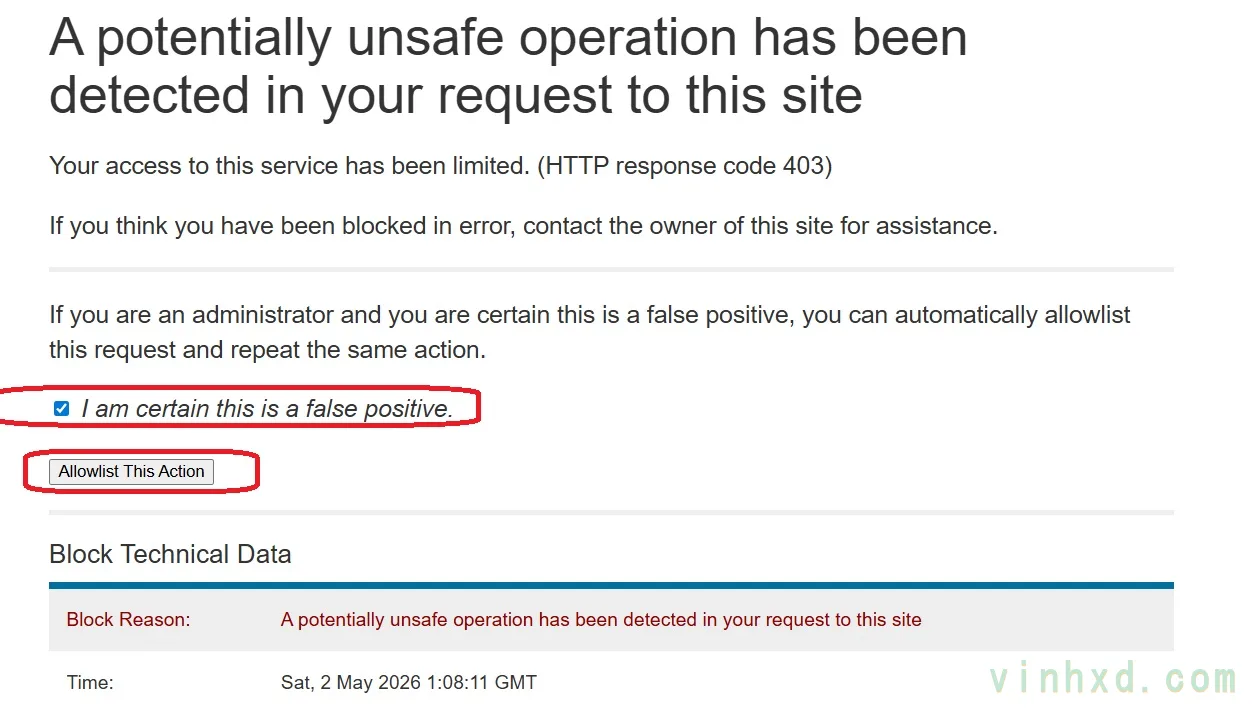
Nếu website cài Wordfence ( Plugin bảo mật cho web mà website nào của khách mình cũng cài ) thì nó sẽ hiện thông báo như ảnh, bạn tick chọn, xong bấm nút bên dưới, rồi tải ấn f5(tải lại) là được nhé.
Làm gì với công cụ này
Sau khi cài xong, trên menu Code Snippets sẽ có 1 menu tên là Chuyển Đổi. Chú ý là công cụ này chỉ ghi nhận data từ Google Ads, và chỉ thu nhập data từ lúc bạn cài đặt, nên nếu web bạn không chạy Google Ads hoặc chỉ mới cài thì không có dữ liệu gì nha
Xem chuyển đổi từ Google Ads
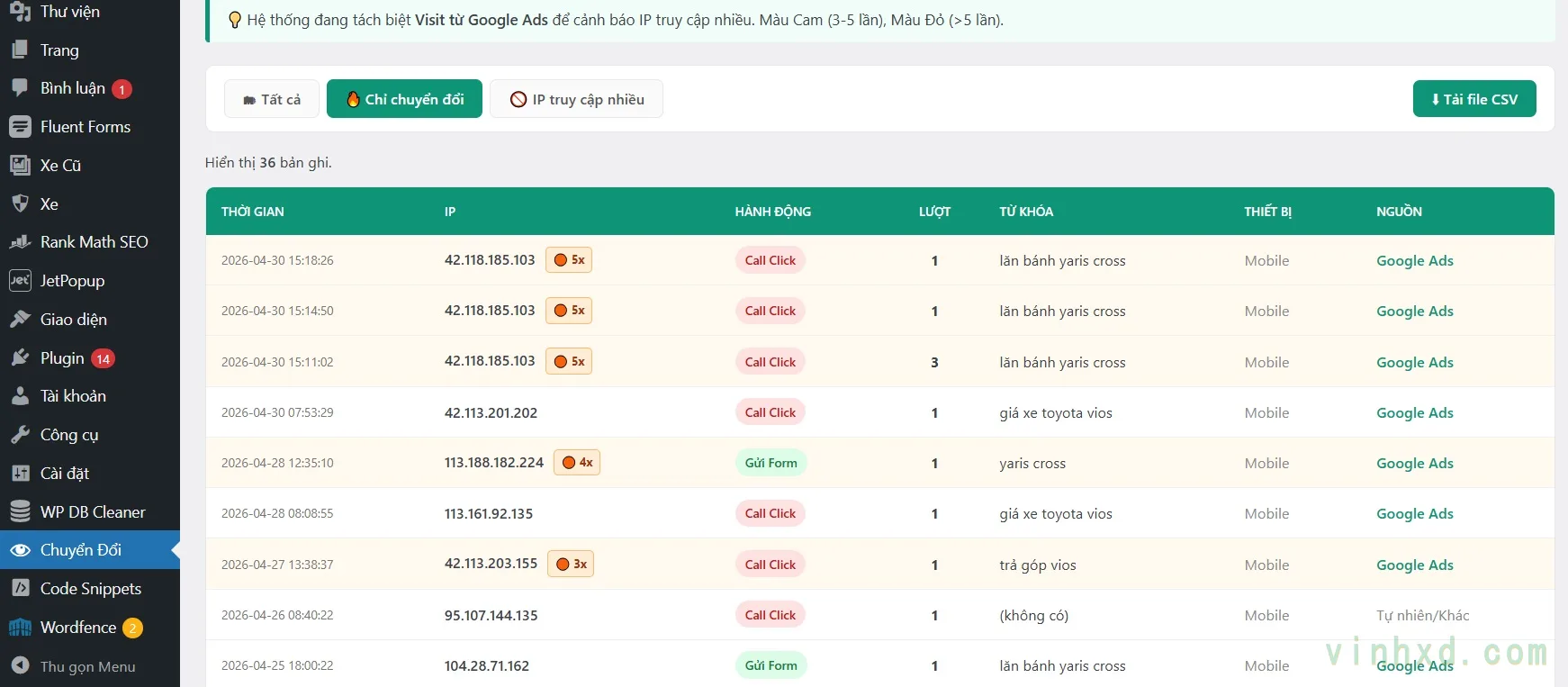
Giao diện Chuyển Đổi sẽ có sẵn 3 tab: Tất cả, Chỉ chuyển đổi và IP truy cập nhiều
Bấm vào mục “Chỉ Chuyển Đổi”, bạn sẽ xem được các chuyển đổi từ google Ads. Chú ý hàng cuối cùng nguồn “Google Ads” nhe, vì nếu chuyển đổi tự nhiên( SEO, bạn tự test..) thì cũng sẽ ghi nhận nhé
Xem IP truy cập nhiều
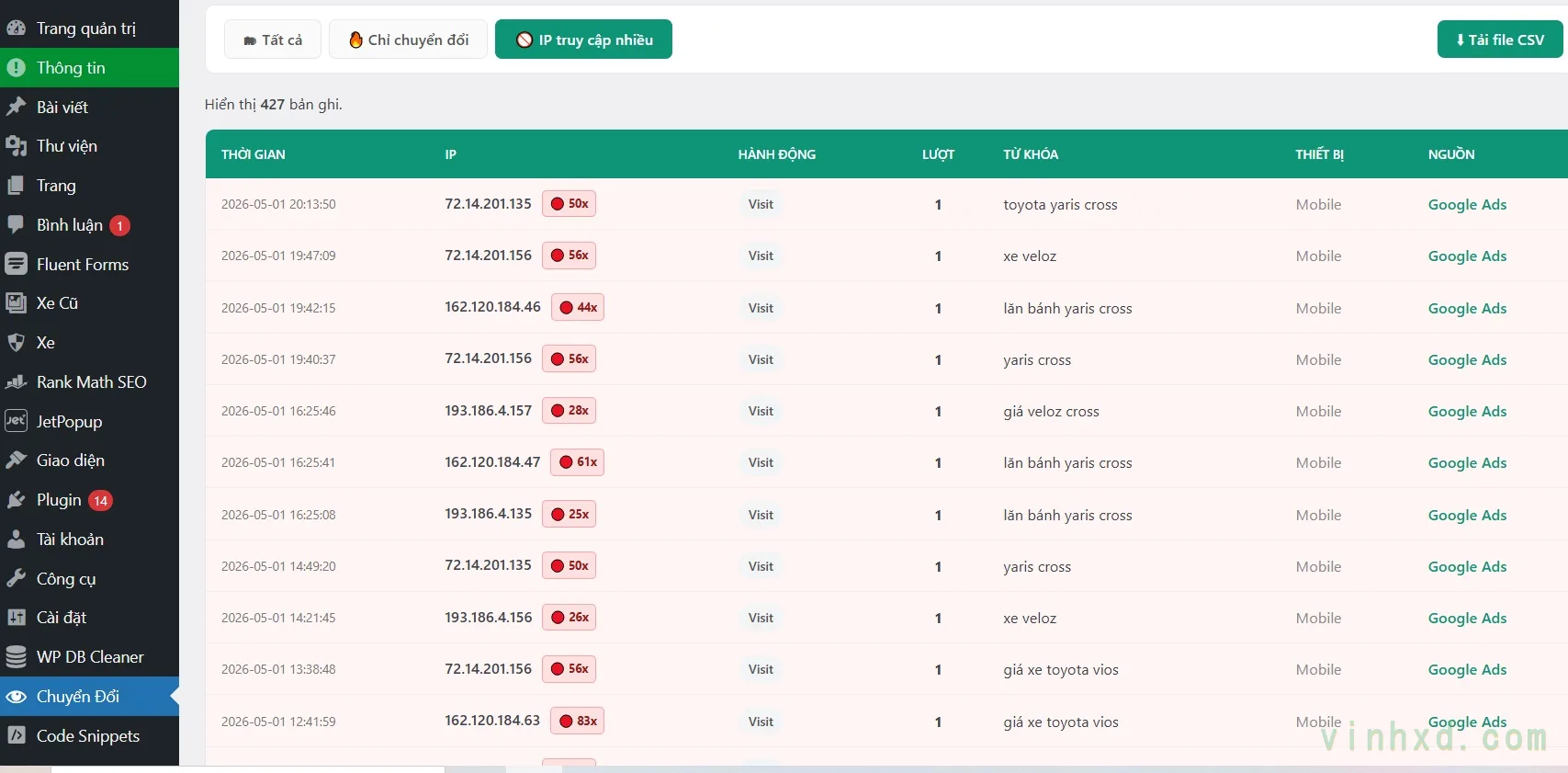
Mục IP truy cập nhiều sẽ là các ip truy cập nhiều từ “Nguồn: Google Ads”. Bạn chú ý thêm đó là các dãy Ip bắt đầu bằng 72.****, 162.****, 193.*** là bot của Google Ads, bot này truy cập không làm tốn tiền của bạn và bạn cũng không chặn được bot này nhe.
- 72.14.201.x: Đây là dải IP thuộc sở hữu của Google LLC. Nó thường được dùng bởi Mediapartners-Google (AdsBot). Nhiệm vụ của nó là truy cập vào trang đích (landing page) để kiểm tra nội dung, tốc độ trang và tính liên quan của quảng cáo.
- 193.186.x.x và 162.120.x.x: Đây cũng là các dải IP từ các trung tâm dữ liệu mà Google thường xuyên sử dụng để giả lập thiết bị di động nhằm kiểm tra trải nghiệm người dùng trên mobile.
Chặn IP truy cập nhiều
Nếu bạn phát hiện IP truy cập nhiều, nhưng không mang lại chuyển đổi, thì nó có thể là Click tặc, click phá… Hãy copy ip đó vào tài khoản Google Ads của bạn. Sau đó vào mục Quản trị ( menu dọc góc trái ) >> Dán IP, sau đó lưu lại là được nhé
Hiện” từ khóa” kích hoạt quảng cáo
Nếu không setup phần này, cột “từ khóa” sẽ chỉ hiển thị là (không có), bạn cần làm thêm thao tác sau để công cụ nghi nhận từ khóa kích hoạt quảng cáo nhe
Bạn cùng vào Google Ads >> Quản trị >> Theo Dõi, phần “Hậu tó URL cuối cùng..”, dán đoạn sau vào
keyword={keyword}&network={network}&device={device}